
Features
Neoli's features, by what they get you.
What sets Neoli apart
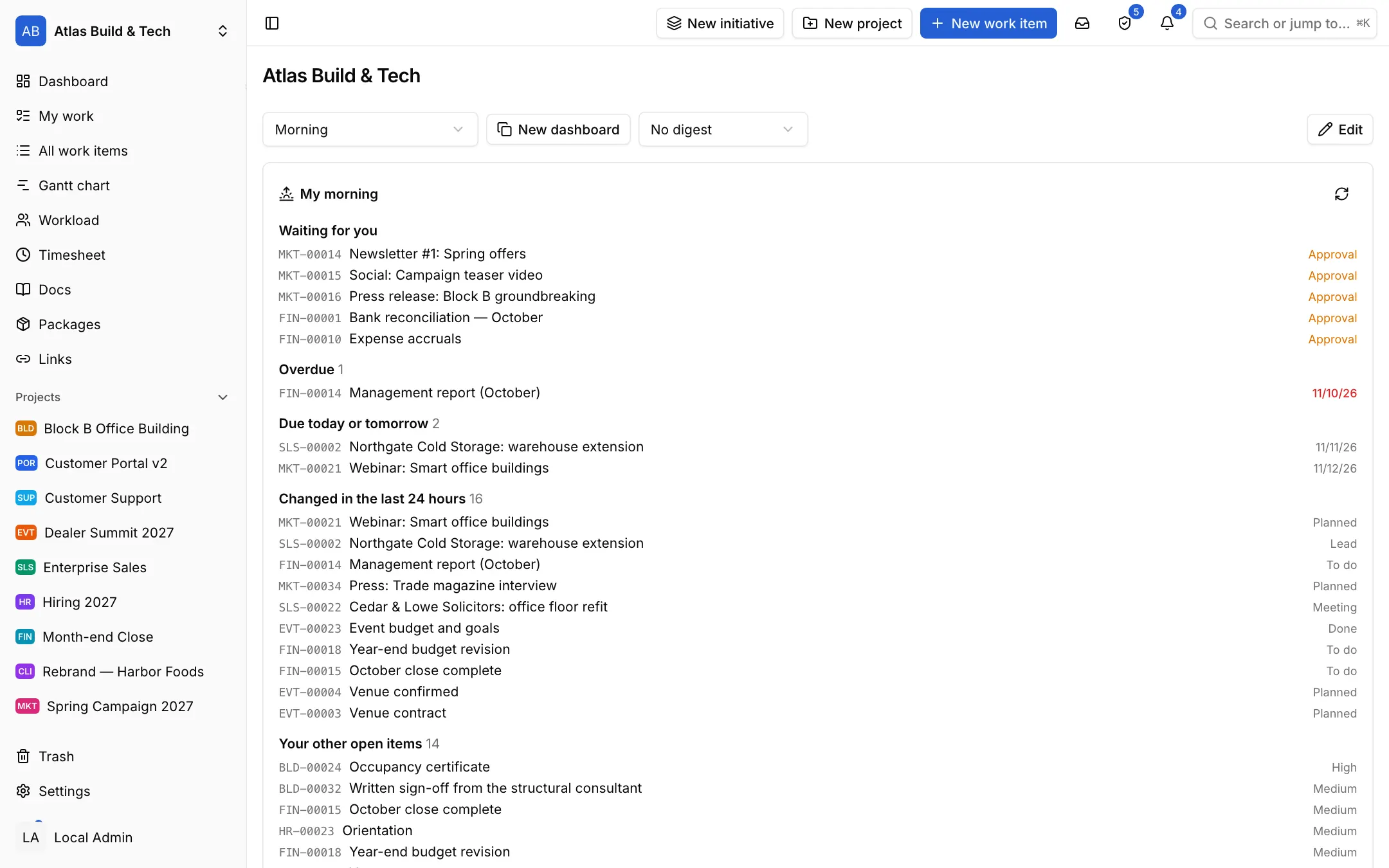
Morning brief
Every morning: what is overdue, due today, waiting for your approval and changed since yesterday; on screen and by e-mail.
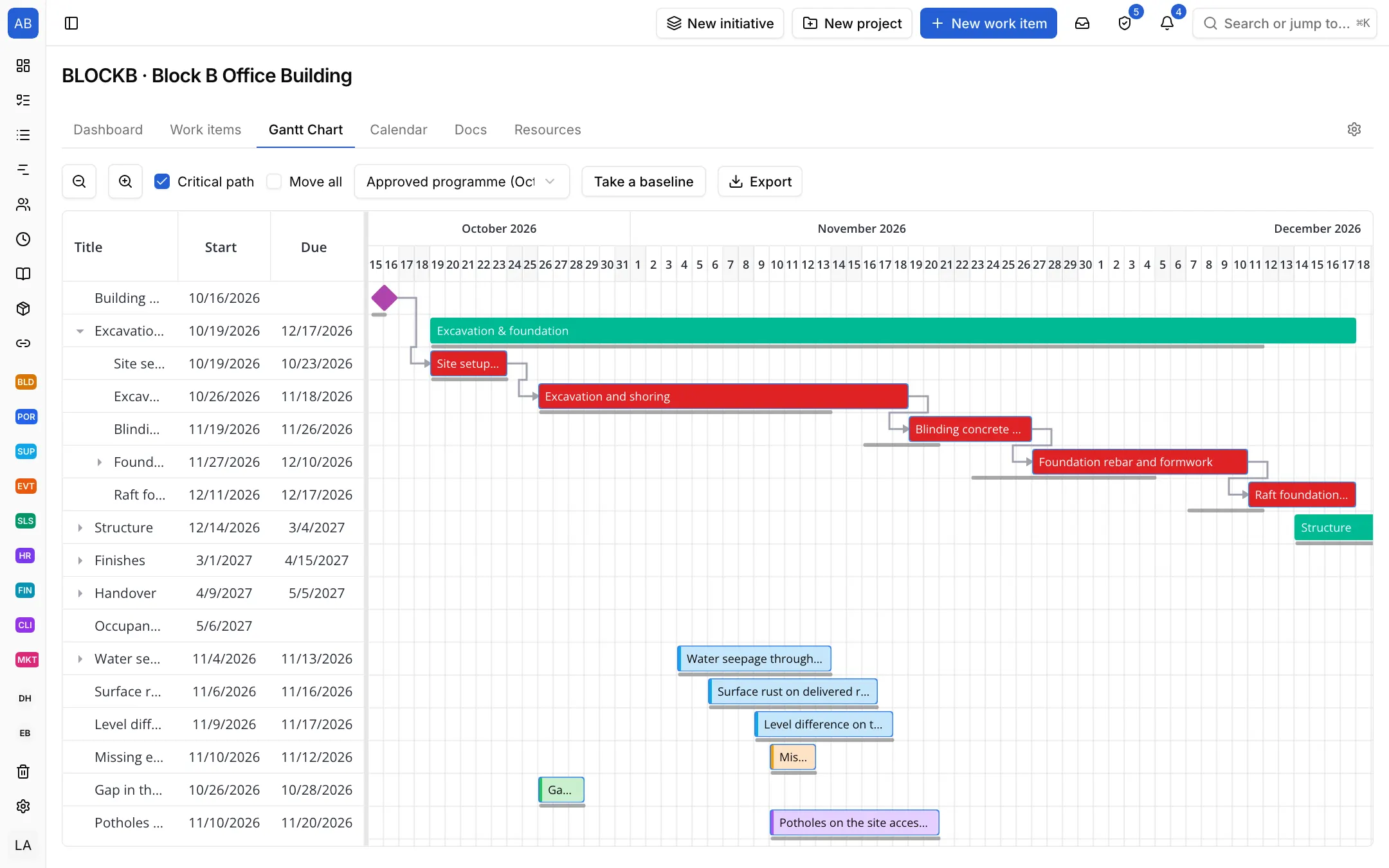
Critical path
See how a slipped task moves the handover and compare it with the approved programme.
Work from e-mail
An e-mail to a project becomes an item; AI tidies its title and description, and the conversation goes on in the same thread.
Tables
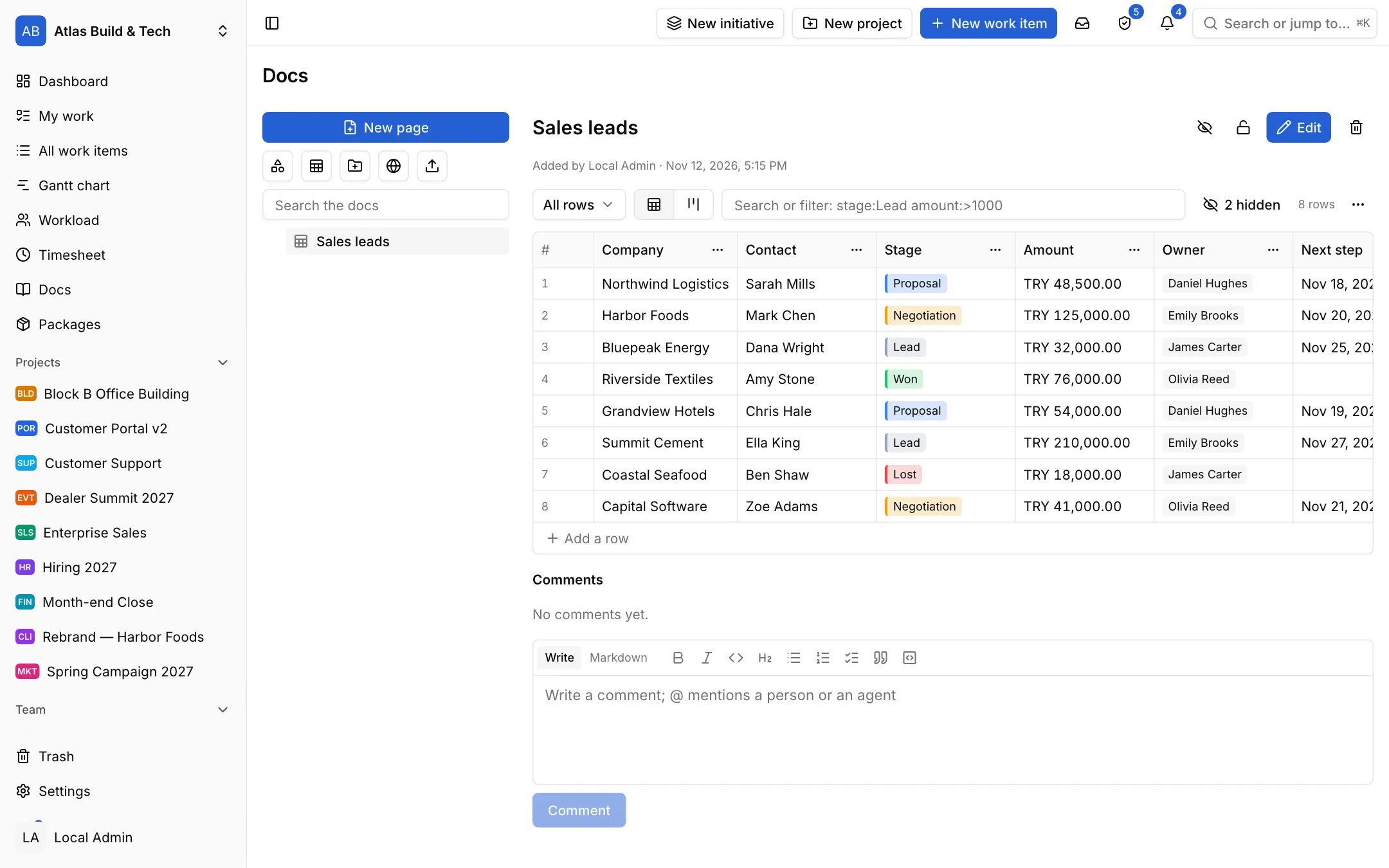
Customer, supplier and inventory lists with your own fields, in your docs; turn a row into an item in one click.
Searchable docs
Drop a folder, keep a copy of a link's page; your team and AI agents find it all with one search.
Customer portal
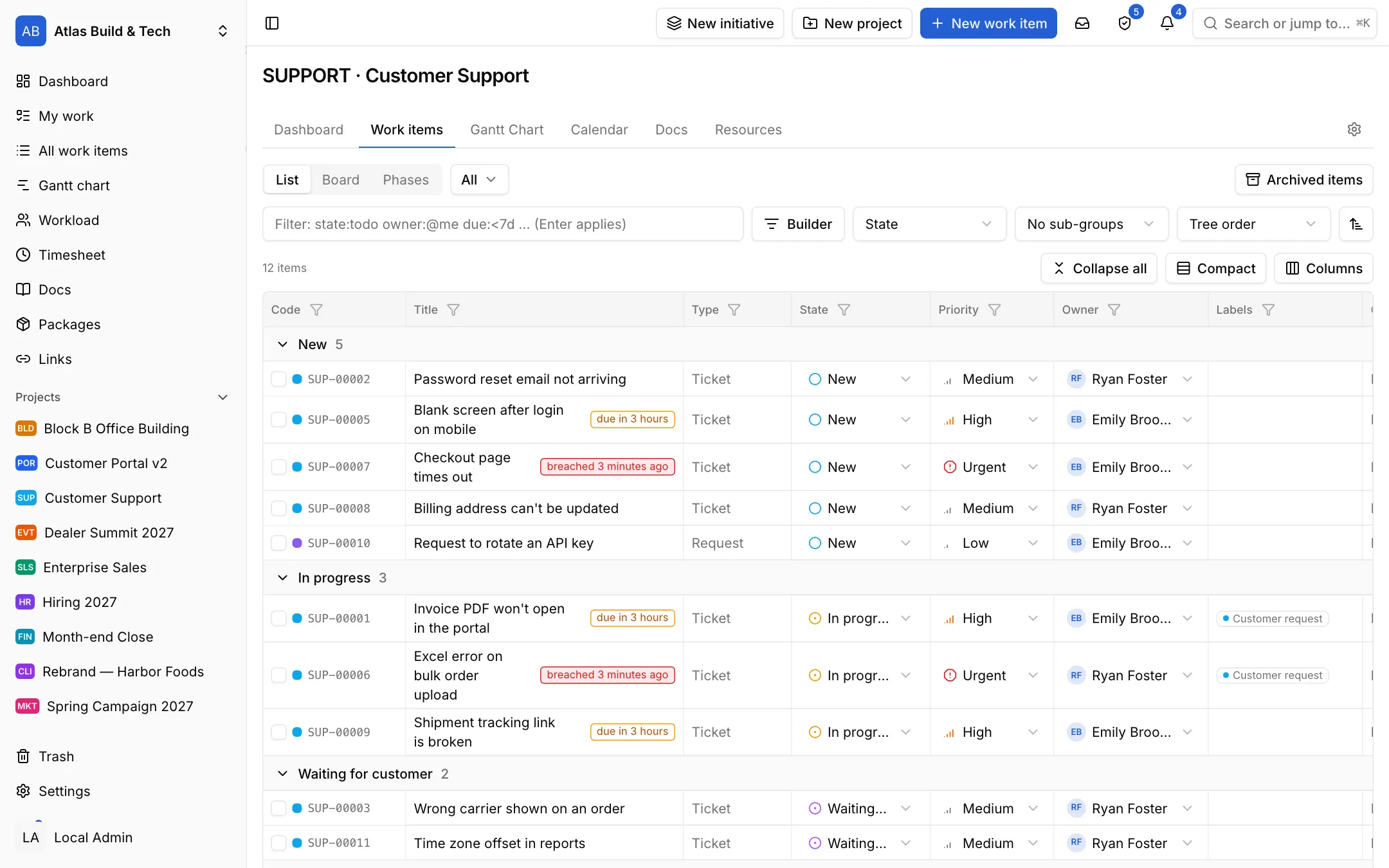
Customers file and follow their requests in their own portal; SLA clocks run in working hours.
Accountable AI
Agents join with their own role, work only in the projects they are allowed, and every action is recorded.
Turkish and local
A Turkish interface, a work calendar with Türkiye's holidays, prices in TL and a KVKK privacy notice.
Finish on time
Build the plan with its dependencies; see how a delay moves the handover without waiting for the meeting.
Gantt chart and critical path
A real schedule with phases, milestones and work that depends on other work.
- Finish-to-start, start-to-start, finish-to-finish and start-to-finish links, with lag
- When a date slips, the dependent work moves too; the critical path and slack are worked out
- Keep the approved programme and see it next to today's plan
- Working days and public holidays from the workspace's calendar
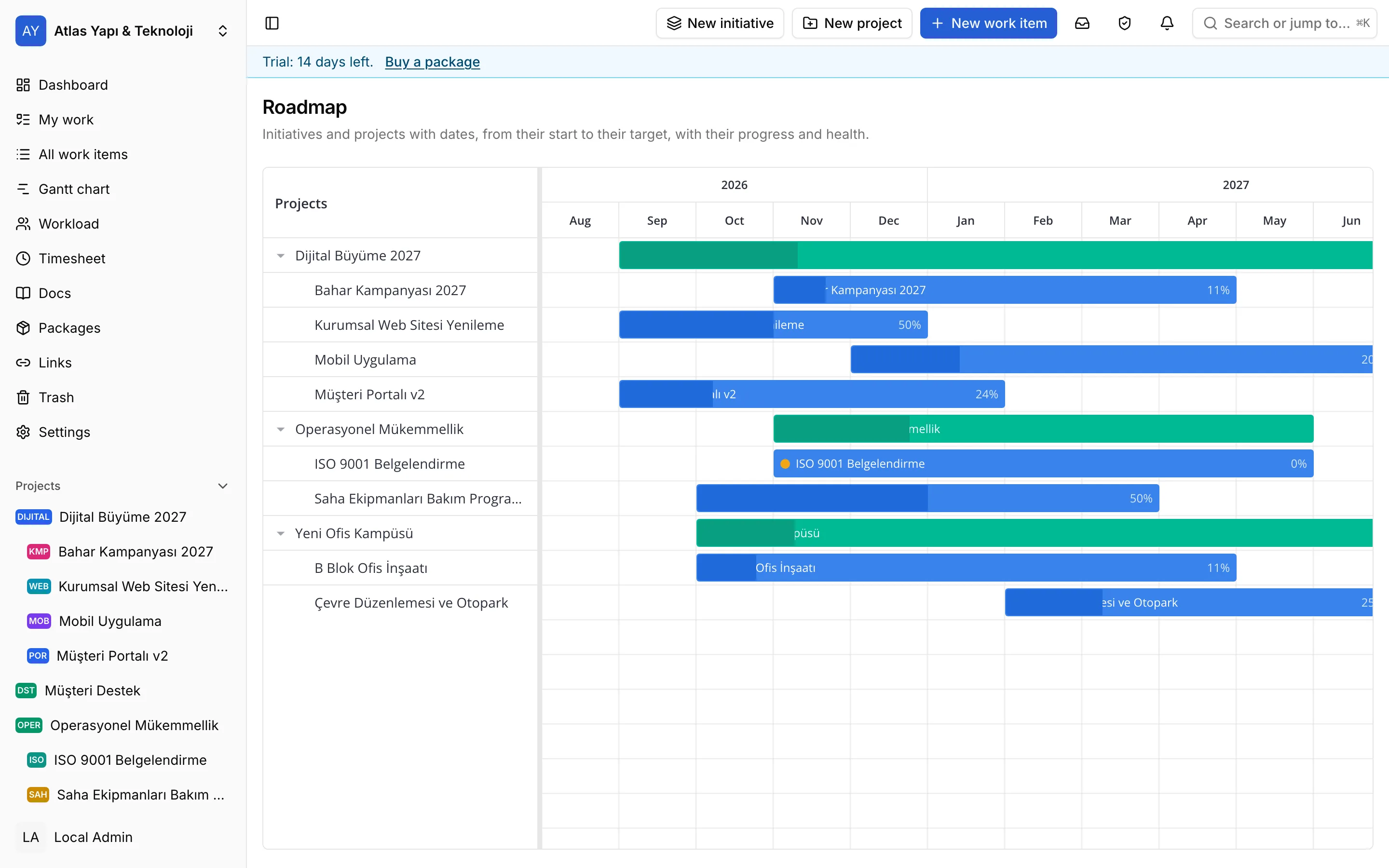
Roadmap and initiatives
Group projects under initiatives; follow their health and target dates in one place.
- Project updates with health: on track, at risk, off track
- Cycles for teams working in sprints or fixed periods
- Milestones whose progress comes from the linked work
Workload
See who has how much work on which day; balance it without dates slipping.
- Capacity in hours, points or item counts
- Owners and contributors counted apart
- Drag work from one person to another
Everyone knows what to do
Who does what by when is clear without asking: a morning brief, notifications on the right channel and dashboards everyone looks at.
Morning brief
Start the day knowing what changed; the same brief on screen and by e-mail.
- Overdue, due today or tomorrow, waiting for your approval or answer
- What others changed since yesterday: assigned to you, asked for by you, handed over by you, followed by you
- If you like, AI writes the day's priority and each change in a sentence or two
- You choose its hour; anyone can turn it off
Notifications
To the right person, on the right channel, at the right time.
- An in-app inbox, e-mail, Telegram, WhatsApp and SMS
- Mentions, @team mentions and the items you follow
- Quiet hours and a daily digest
- Subscribe to a dashboard and get its digest regularly
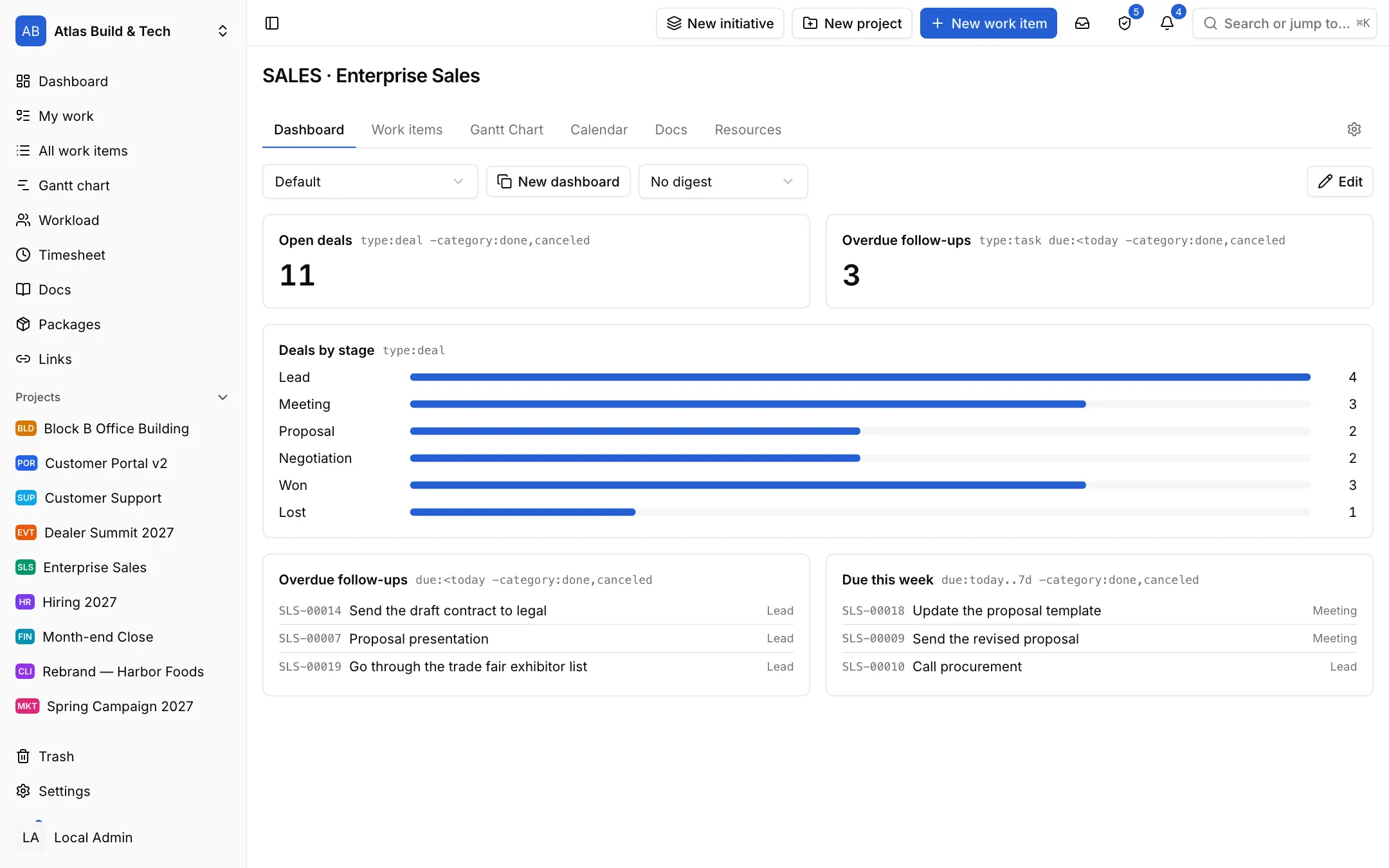
Dashboards
Bring progress, overdue work and load across projects onto one screen everyone looks at.
- Number, list and chart widgets fed by NQL
- Activity summaries by project, person and period
- Insights such as flow, cycle time and SLA; CSV export
Work in one place with your customers
Requests do not get lost in e-mail threads: incoming e-mail becomes work, the customer files in the portal, you answer before the clock runs out and bill the hours spent.
Items from e-mail
Every message to a project's address becomes an item; the conversation stays in e-mail, the record in Neoli.
- Each project has its own address: a new message opens an item, its attachments become the item's files
- When the workspace has an AI model, the message goes through it first: a short title and a clear description, with greetings, signatures and quoted earlier mail left out; the original message is kept on the item as a file
- The sender's replies land on the same item as comments; the team's public comments go back to them in the same thread
- You choose who may file: members only, your customers' addresses, or anyone
Customer portal and SLAs
Let your customers file requests; answer on time with first response and resolution targets.
- A portal where the customer sees only their own requests; e-mailed requests too, if you like
- A reply to the customer and an internal note they never see, on the same ticket
- SLA targets in working hours, the clock stopping in waiting states
- At-risk and breached markers, sorting by what is due first
Time tracking and billable hours
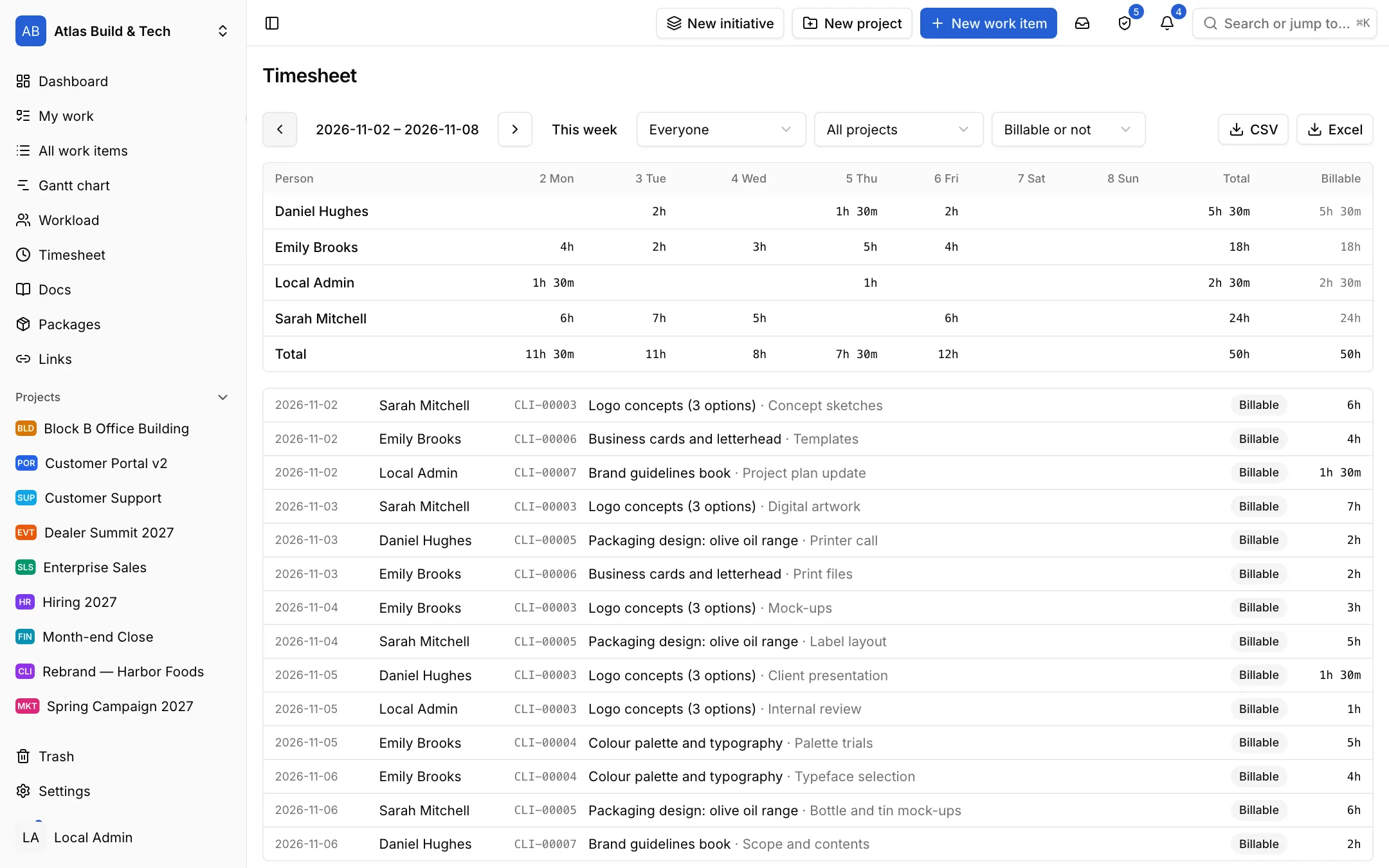
Log time with a timer or by hand, compare it with the estimate, take it to the invoice.
- Time logs marked billable or not
- Timesheets by person and week, CSV export
- Time rolled up from sub-items
Keep knowledge next to the work
Docs, links and lists do not scatter across folders, spreadsheets and browser tabs; they sit next to the work, and your team and AI agents find what they look for.
Tables
A customer list, suppliers, an inventory: a small database with your own fields, inside your docs.
- Text, number, currency, percent, date, select, person, item, rating and formula fields; fields that link to another table's rows, and fields that bring in or add up values from the linked rows
- Grid and kanban views; saved, shared views with their filters, sort and hidden columns
- Turn a row into an item in one click; the item stays linked and its page shows where it came from
- CSV import and export; numbers and dates read as people write them
- Ready templates: a CRM list with a sales pipeline, suppliers and software packages
Docs and links
Pages, files and web links in folders; linked to items and searchable.
- Drop a folder from your computer; it uploads with its subfolders and files in the same structure
- Links are docs too: keep a Markdown copy of the page when you like, so its content stays with you even if the page changes or goes away
- Full-text search over titles, pages, link copies, text files and table rows; each hit with its folder path and a snippet
- Versions, comments and @mentions, locked and private pages, drawings
- AI agents read, search and write docs and files over MCP
Automate the repetitive work
Do not rebuild the same checklist every month; templates, rules and AI take over the repetition.
Setups and templates for your kind of work
Ten ready project setups with states, item types, item templates and views.
- Construction, software, support, marketing, recruiting, sales, events, month-end close, client projects and general
- Item templates that come with sub-items and checklists
- A new project can start with sample items, gone in one click
- Keep a project as a template and use it for the next ones
Automations and repeating items
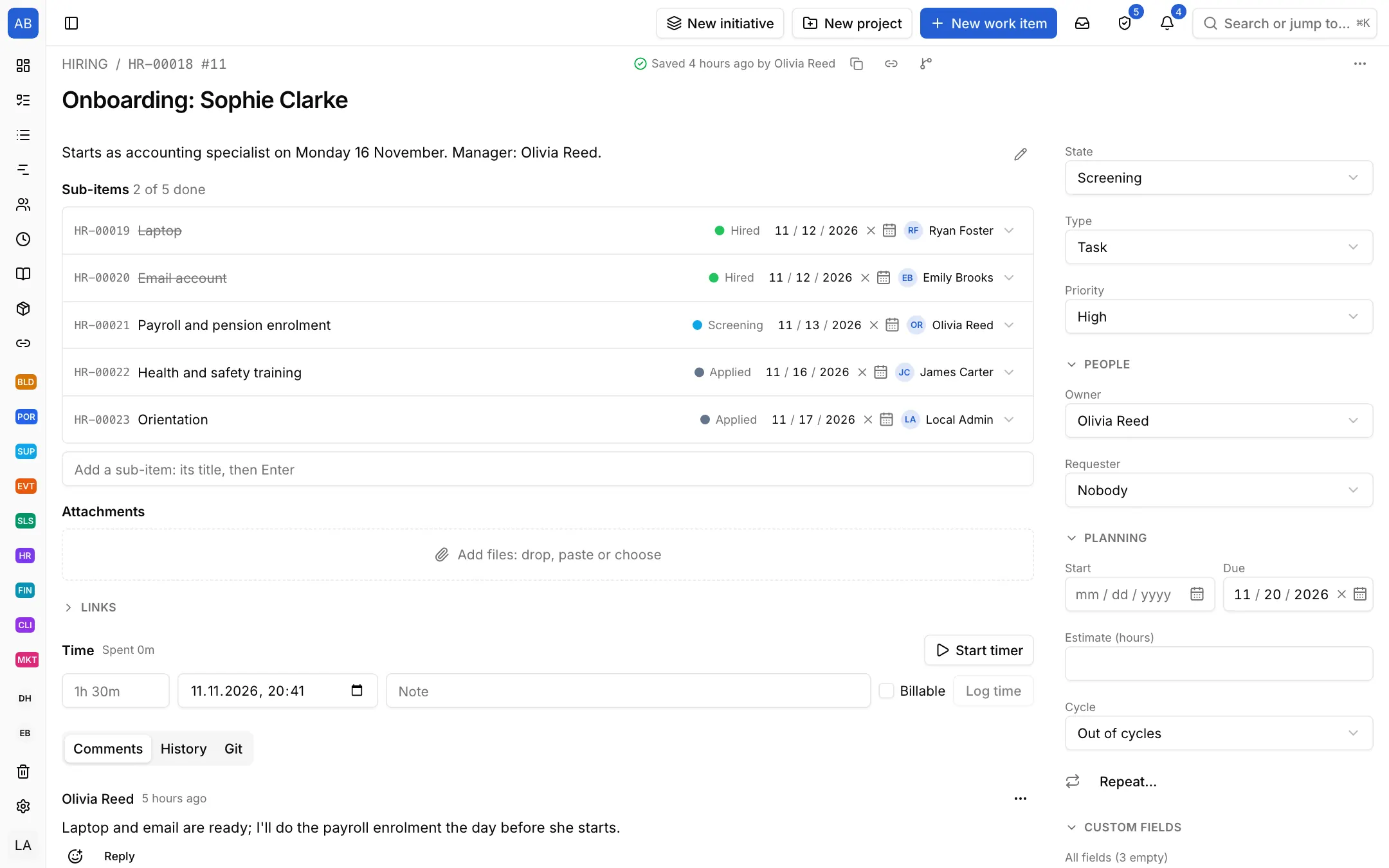
Leave the manual repetition to rules.
- Rules that run when an item is created, a field changes or a comment comes in; with an NQL condition
- Buttons that run in one click and scheduled rules that run on time
- Actions to change fields, move, assign, comment, create items, notify and call webhooks
- Items that open by themselves every week or month; approval on a state change
AI and agents
An accountable team member that drafts, summarises and works on items.
- Items created from free text, previewed before saving
- Summaries of discussions, activity and the morning
- Agents with their own role, limited to chosen projects, every action recorded
- Your own model and key: Claude, Gemini and others
Work with your team's tools
Developers reach the same plan from Git, the terminal and an AI assistant; everyone sees the same work.
GitHub and Gitea
Link branches, commits and pull requests to items; let merges move them forward.
- Links from item codes in branch names, commits and pull request titles
- Closing words: Fixes WEB-42 on the default branch closes the item
- Rules per project from branch created to merged
MCP, command line, API and webhooks
Reach your work from an AI assistant, the terminal, a script or another app.
- An MCP server for AI assistants, with OAuth and a read-only mode
- The neoli command line and terminal UI: an item in one line, from a template, a board to browse
- A REST API documented with OpenAPI, access keys and OAuth apps
- Signed webhooks with retries and a delivery log
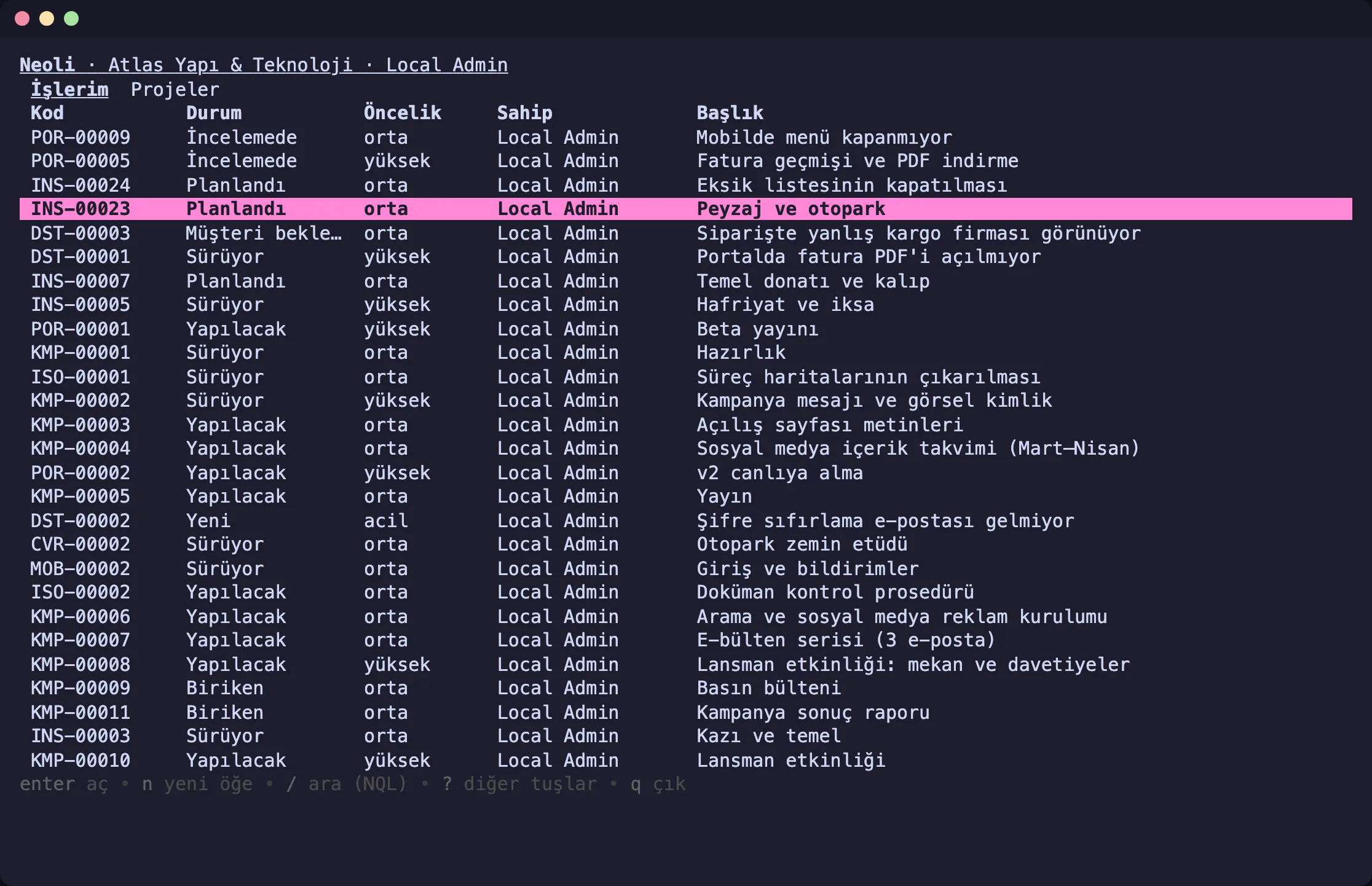
NQL query language
Find any item in one line: owner:@me due:<7d -category:done.
- The same query language on the web, the command line, the API, MCP and in automations
- A visual filter that writes the query for you
- Ask in plain words and AI turns it into a query
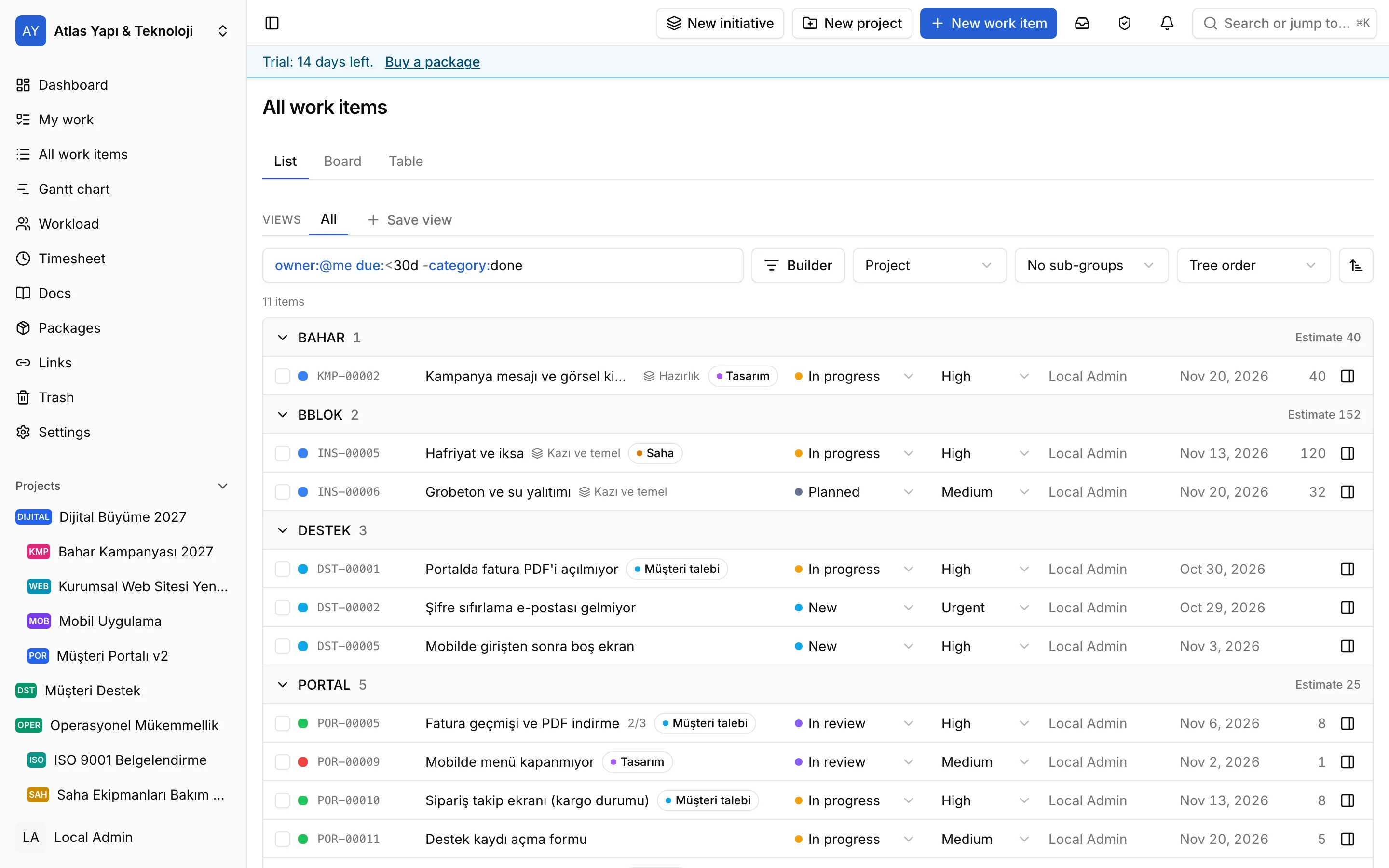
And of course
- List, board, table and calendar views
- personal and shared saved views
- sub-items, checklists and linked items
- teams and custom roles
- an audit log and a full workspace export
- Turkish and English interface
- a web app you can install on your phone
Bring your team's plan into one place
Open your workspace in a minute and invite your team.
Start free